Hey everyone! I'm so excited to finally dive into Ableton Live 12.2 - and honestly, this might be one of my favorite updates in years. As someone who uses phaser and filter in literally every track I make, seeing these tools get major improvements has me genuinely thrilled.
I spent the first day with the update just jamming and exploring, and I want to share what's got me most excited about this release.
The New Auto Filter is a Game Changer
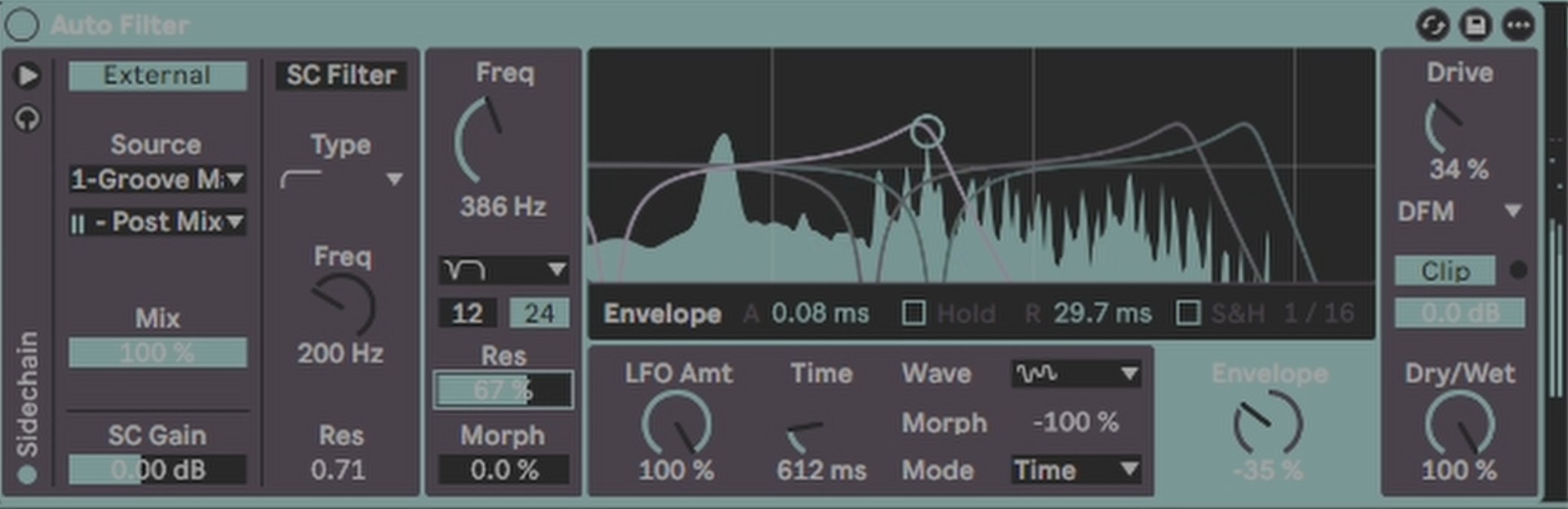
Let's talk about the elephant in the room first - the completely redesigned Auto Filter. This thing is absolutely incredible now.
We finally have comb filtering - something I've been wanting forever. The new filter types include notch plus LP (low pass and notch combined), which creates these beautiful holes in the frequency spectrum that give you so much room to play with sound design.
What really gets me excited is the visual feedback. You can now see exactly what's happening to your sound as you modulate it. No more guessing - you get real-time visual representation of how everything is being "scrambled up" (as I like to say).
The new phase control lets you offset left and right channels by any degree you want. Try 45 degrees and you'll hear this beautiful stereo width that adds so much character to your sounds.
And here's something huge for my workflow: side chaining is now built into everything. You can side chain the entire filter, which opens up incredible rhythmic possibilities. I can finally make my filter movements bounce perfectly with my kick pattern without needing external routing.
Roar Gets Smarter with MIDI Note Following
Roar was already one of my go-to devices for sound design, but now it's become something special. The feedback mode can now follow MIDI notes - meaning you can put it in key and it will track your musical content.
But what I'm really loving is the external chain functionality. I can route my kick drum to Roar's side chain input, and suddenly all those random modulations Roar creates are locked to my groove. It's like having controlled chaos that stays musical.
This is exactly how I think about music production - you have your foundation groove, and then elements that interact with it in interesting ways. Roar now makes that interaction much more musical and intentional.
Spectral Resonator Finally Makes Sense for Me
I've always liked the Spectral Resonator conceptually, but it had one major problem for me: it would always play out of key. You'd get these beautiful granular textures, but they'd clash with your harmonic content.
With the new key awareness features, this problem is solved. You can now quantize the harmonics of the resonator to stay in key with your track. I set up a scale at the top of my session, and boom - everything locks together harmonically.
This is going to be huge for my ambient work. Being able to granulate sounds live while keeping everything perfectly in key opens up so many creative possibilities.
Melt Gets Even More Musical
Melt already had that beautiful chord engine, but now with the enhanced key awareness throughout Ableton, it's becoming even more powerful. You can layer oscillators and instantly get chord effects, then use the scale function to keep everything harmonically related.
I'll be honest - I haven't used Melt as much as I should have, but this update is making me want to dive deeper. It might be time to treat it like my trusty Operator and really master its capabilities.
The Little Things That Make a Big Difference
Some smaller updates that are going to improve my daily workflow:
-
Bounce to New Track: Finally! You can right-click on MIDI in the arrangement view and bounce directly to audio. No more recording everything manually - this workflow improvement was long overdue.
-
Visual LFO Feedback: Having visual representation of modulation means I don't need as many external LFOs cluttering up my sessions. This is going to make my projects much more CPU-friendly.
-
Enhanced Browser: While I'm still a Command+F person, the new tag system looks helpful for staying organized.
Why This Update Excites Me
What I love most about this update is how it enhances creativity without getting in the way. These aren't flashy features that try to do everything for you - they're thoughtful improvements to tools I already use constantly.
The key awareness features especially align with how I think about music production. Having everything stay in harmonic relationship while still allowing for experimentation and happy accidents is exactly what I want from my tools.
And the fact that side chaining is now built into so many devices means I can create those rhythmic interactions I love without complex routing. Everything can bounce with the groove more easily.
What's Next?
I'm planning to do some deeper dives into specific features soon. The expressive chords functionality looks particularly interesting for creating progressions I'd never think of on my own.
But for now, I'm just excited to have these improved tools in my daily workflow.
The filter alone was worth the wait - having comb filtering, better modulation options, and visual feedback in one package is going to change how I approach sound design completely.
Time to get back to experimenting! Let me know in the comments what features you're most excited about, or if you've discovered anything cool I missed.
Keep creating, and make it your own!
Want to dive deeper into hypnotic techno production? Check out my Hypnotic Techno Essentials Pack - now with techniques that work perfectly with these new Ableton features.