Hey there! Nice to have you here. I hope you're doing great today.
You know me – I'm usually not the biggest fan of VST plugins. I just have this thing about keeping my workflow clean and not cluttering my creative space with external stuff. But recently, I stumbled across something that made me completely change my mind about one particular plugin.
I'm talking about SpaceBlender by Soundtoys.
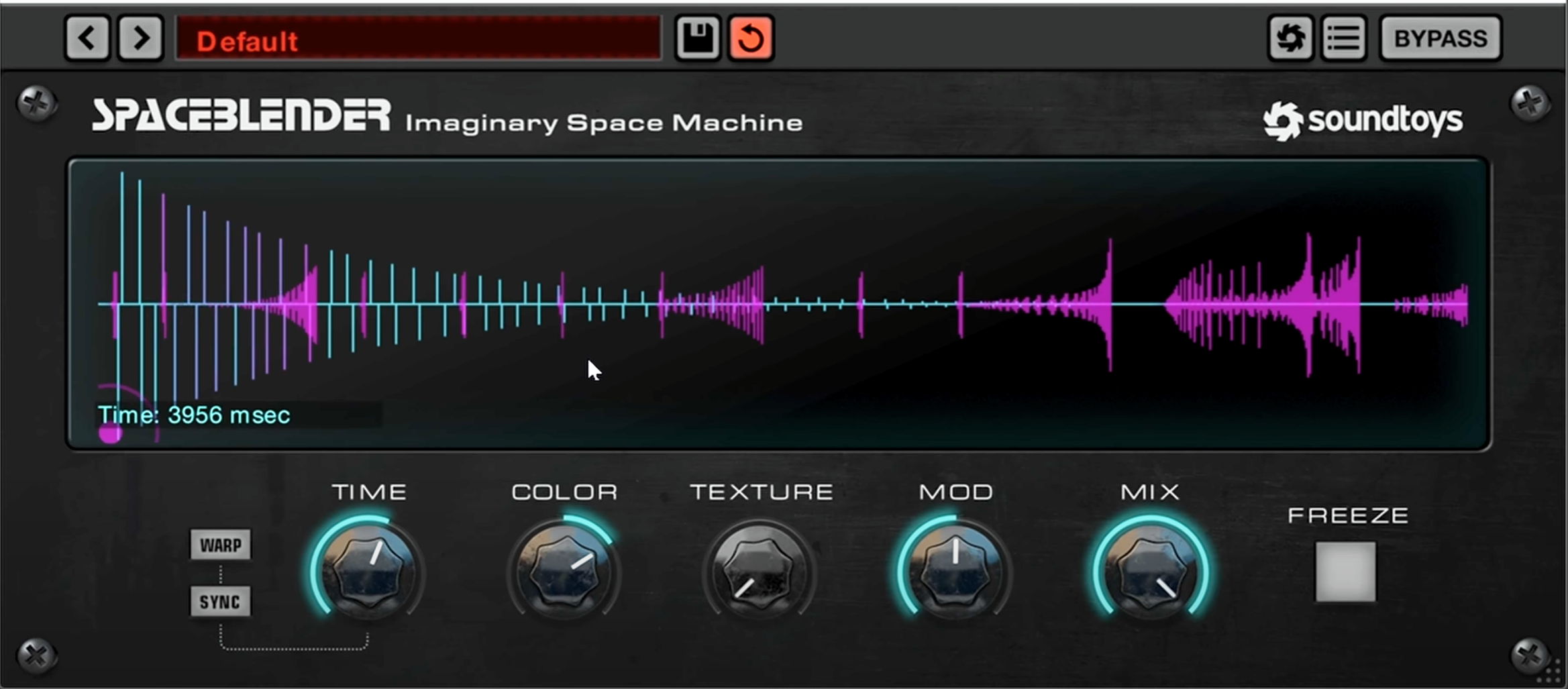
What Makes Space Blender Different?First off, let me tell you what caught my attention. This isn't your typical reverb, and it's not quite a delay either. It's something beautifully in between, and that's exactly what made it so interesting to me.
When I first loaded it up, I was testing it with my Hyperplash device (that little random sound generator I love using for hypnotic booms). What I heard completely surprised me – it just makes everything sound incredibly high-end and wet without drowning your sounds in muddy reverb.
Breaking Down the ControlsLet me walk you through the main parameters so you can understand how this thing works:
Time ControlThis is where the magic starts. You can go from 100 milliseconds all the way up to a full minute. This range is absolutely amazing for creating ambient textures. Short settings give you tight, room-like spaces, while longer settings open up vast, atmospheric landscapes.
Color ParameterThink of this as your frequency shaper (Filter). Push it to one side, and you get more high-pitched character. Push it the other way, and everything gets warmer and lower. It's incredibly intuitive – you can really sculpt interesting tonal combinations here.
Texture ControlThis is where you decide whether you want something more reverb-like or more delay-focused. It's not just a blend – it actually changes the character of how the space behaves. More texture gives you that roomy feeling, while less texture pushes it toward rhythmic delay territory.
Mod SectionHere's where things get really interesting. When you push the modulation all the way up, you get this random movement that affects the stereo image. I'm not exactly sure what it's doing under the hood (Soundtoys doesn't spell it out), but it makes everything sound more alive and textured – perfect for ambient work.
With the mod down, you get more of a static reverb loop. With it up, everything becomes more dynamic and breathing.
The Freeze Function and BeyondOf course, there's the classic freeze button – essential for creating those beautiful drone textures we all love. But here's where Space Blender really shines: you can warp the frozen material.
Change the time parameter while something is frozen, and you get pitch shifting. Go faster, pitch goes up. Slow it down, pitch drops. You can even sync it to your project tempo and create rhythmic pitch movements.
And that little ball control? That changes the room shape from full reverbs to classics to reverse – even some really wild "boom" settings that I'm still exploring.
My Workflow with Space BlenderHere's how I've been using it in my productions:
-
Recording Ambient Textures: I set up a long time setting, hit record, and just let it run. The constant movement and evolution creates perfect background textures that are always changing.
-
Live Modulation: I map envelope followers and LFOs to multiple parameters. The visual feedback is fantastic – you can actually see the space morphing in real-time.
-
Master Chain Processing: Sometimes I just throw it at the end of my master chain and play with a synth. Hours of fun, guaranteed.
-
Loop Creation: Record some audio through Space Blender, then use those textures as the foundation for new tracks.
Why This VST Won My HeartLook, I'm pretty critical when it comes to plugins. I don't want to add more noise to my already complex creative world. But [[Space Blender]] does something I haven't seen before – it actually blends spaces together in a way that feels organic and musical.
It's not trying to emulate a specific reverb algorithm or delay type. Instead, it creates its own category of spatial processing that just works beautifully for sound design.
Making It Your OwnThe real beauty of Space Blender is that there's no "right" way to use it. Start with the basic settings I mentioned, but then experiment. Push parameters to extremes. Modulate everything. Record your experiments.
The visual feedback alone will inspire you to try new combinations. And when you start layering it with your own devices and processing, that's where the real magic happens.
Final ThoughtsIf you're into sound design and creating hypnotic, evolving textures, Space Blender is definitely worth checking out. It's one of those rare plugins that actually expands your creative possibilities rather than just giving you another flavor of something you already have.
Even as someone who usually avoids VSTs, I have to admit – [[this one earned its place in my toolkit]].
Give it a try, experiment with it, and most importantly – make it your own.
What processing tools have surprised you lately? I'd love to hear about your discoveries.
Peace,
MORDIO